CDS Views
In complex industries like steel, automotive, or machinery, configuration logic often depends on rich, interconnected master data—such as product forms, specifications, grades, coatings, and packaging. Managing such dependencies using static AVC tools like variant tables can quickly become rigid, error-prone, and disconnected from live business data.
The mdVC CDS connector solves this by linking configuration characteristics directly to CDS views. These views can represent complex dependencies from various data sources—SAP master data, QPPD models, custom logic, or even external systems—evaluated dynamically at runtime. This enables master data-driven configuration with high flexibility and no duplication of logic.
While the following example references QPPD Views, the CDS connector is fully generic. It can be used with any data source—internal or external (Custom Entity CDS View).
Why CDS Instead of AVC Logic?
AVC dependencies—especially variant tables—have several limitations:
- Manual maintenance effort
- Risk of inconsistencies
- No reuse outside of AVC
- Disconnected from actual business data
By contrast, CDS views offer:
- Full modeling flexibility (joins, enrichment, filters, semantics)
- Live access to real master data
- Reuse across applications (Fiori apps, reporting, APIs)
- Centralized, declarative business logic
Using CDS makes configuration transparent, data-driven, and scalable—a best practice for S/4HANA-based modeling.
How It Works
A configuration instance is linked to a CDS consumption view, which collects and resolves dependencies. Multiple CDS view groups can be involved (technically, this means multiple CDS tasks). Each view filters valid values or derives characteristic values at runtime.
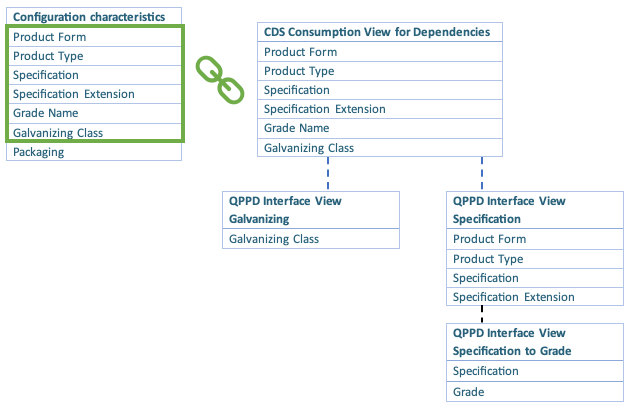
By default, characteristics are matched to CDS view fields by name. However, field mappings can be customized when defining the task. The CDS view consolidates data from various sources and exposes valid combinations to the configuration process.
Behavior and Scope
The CDS connector task executes the following logic:
- Restrict value help based on current characteristic values
(e.g. only certain packaging types are valid for "Sea" transport) - Auto-determine values when only one valid option remains
info
Determination only applies if the user hasn't already entered a value.
- Set characteristics to read-only when only one valid value exists
- Validate uniqueness: the current combination of values must match exactly one CDS row. Otherwise, an error is raised.
This ensures that configuration stays consistent with the actual business logic modeled in master data.
Examples
Configuration Instance (User Input)
| Characteristic | Value |
|---|---|
| Product Form | COIL |
| Product Type | CR |
| Specification | |
| Specification Extension | |
| Grade Name | |
| Galvanizing Class | |
| Packaging |
CDS Consumption View
The following table shows all available combinations. Rows not matching the user input (e.g. invalid product type/form) are excluded from evaluation.
| Product Form | Product Type | Specification | Specification Extension | Grade Name | Galvanizing Class |
|---|---|---|---|---|---|
| COIL | CR | EN10130:2006 | DC01 | No | |
| COIL | CR | EN10204 | 4711 | DC01 | No |
| COIL | CR | EN10204 | DC03 | No | |
| COIL | HDC | EN10168 | DC05 | A | |
| SHEET | HR | EN10204 | DC03 | C | |
| PLATE | HR | EN10168 | DC03 | B |
Configuration After CDS Evaluation
With only one matching value for Galvanizing Class, it is determined automatically:
| Characteristic | Value |
|---|---|
| Product Form | COIL |
| Product Type | CR |
| Specification | |
| Specification Extension | |
| Grade Name | |
| Galvanizing Class | No |
| Packaging |
However, since more than one row remains, the configuration is still not unique, and an error is raised:
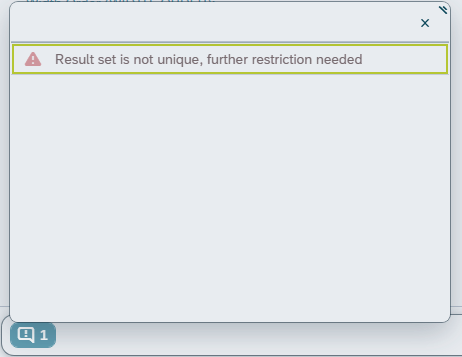
We recommend wrapping the CDS connector in a Settler Task to re-evaluate logic as values evolve dynamically.
Available Values (Value Help)
| Product Form |
|---|
| COIL |
| Product Type |
|---|
| CR |
| HDC |
| Specification |
|---|
| EN10130:2006 |
| EN10204 |
| Specification Extension |
|---|
| 4711 |
... and others ...
Multiple CDS Views (intersection logic)
In some complex scenarios you need more than one CDS view to describe the
same configuration. The new task class /mxp/vcha_cl_va_cds_link_multi supports
multiple views at once. The idea is simple:
- characteristics that appear in every configured view are treated as a shared key. The allowed values for those characteristics are the intersection of the result sets from all views. This means the final value set is limited by all data sources simultaneously.
- any characteristic that is present in only one view behaves exactly as in the single‑view connector – restrictions, determination, read‑only marking and uniqueness validation are calculated based on that one view alone.
- parameters and field mappings are still configured per view; each view runs independently except for the shared characteristics.
A small but powerful hook exists for custom logic: the method
is_view_relevant in /mxp/vcha_cl_va_cds_link_multi can be redefined by a
Z‑class subclass. It is invoked for every configured view before it participates
in the intersection calculation. Returning abap_true includes the view; if
abap_false the view is skipped completely. This allows scenario‑specific
filters such as "only execute view B when ProductForm = COIL". The single‑view
connector has the same method, but it's particularly handy in multi‑view
setups where you need fine‑grained control over which views are active.
Worked example with two views
Assume the first view is exactly the one shown above with columns
Product Form, Product Type, Specification, … etc. Now we introduce a
second consumption view that contains the two shared columns plus an additional
Edge Condition field:
| Product Form | Product Type | Edge Condition |
|---|---|---|
| COIL | CR | STANDARD |
| COIL | CR | HEAVY |
| COIL | HDC | STANDARD |
| SHEET | HR | STANDARD |
When the connector is configured with both views the behaviour is as follows:
- Shared columns (
Product FormandProduct Type) are restricted by the intersection of the two result sets. In our example the only combinations that survive both views are the green rows from the first table above (COIL/ CR). As a consequence for this example, the value help for those two characteristics will show the same limited set regardless of which view supplies additional fields. - Non‑shared columns (e.g.
Specification,Grade Name,Edge Condition) continue to work independently. Restriction, determination and uniqueness are computed with the respective view’s rows; the connector does not join the two tables, it merely combines the filter criteria on the shared keys. - Intersection logic also applies when the configuration instance already contains values: the multi‑view task will look up each shared characteristic in every view and only keep those candidate values that appear in all views. This avoids situations where different data sources disagree on the allowed combinations.
The multi‑view connector is handy when you need to overlay several datasets (e.g. a standard master view and a customer‑specific enhancement view) while ensuring the common subset remains consistent. It can also be used to implement conditional logic that cannot be expressed in a single CDS consumption view.
Usage
To use the CDS connector, instantiate the task class /mxp/vcha_cl_va_cds_link and pass your CDS view name:
new /mxp/vcha_cl_va_cds_link( 'ZC_MY_CONSUMPTION_VIEW' )
By default, all characteristics whose names match CDS fields are considered. You can optionally define:
- Field mappings (custom characteristic ↔ field name)
- Ignored fields
- Parameter definitions (e.g.,
THICKNESSas a CDS view parameterP_THICKNESS)
These task can be used standalone or embedded in a composite task. Wrapping them in a Settler Task is recommended for resolving interdependent logic.
Any CDS view used by a CDS task must be released for system-internal use to comply with clean core principles (contract C1).
In the examples shown, a CDS view ZC_MY_CONSUMPTION_VIEW must be explicitly released. This ensures the framework can safely consume the view at runtime.
Follow the standard release process:
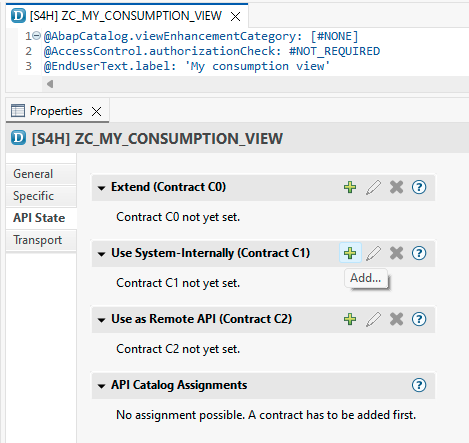
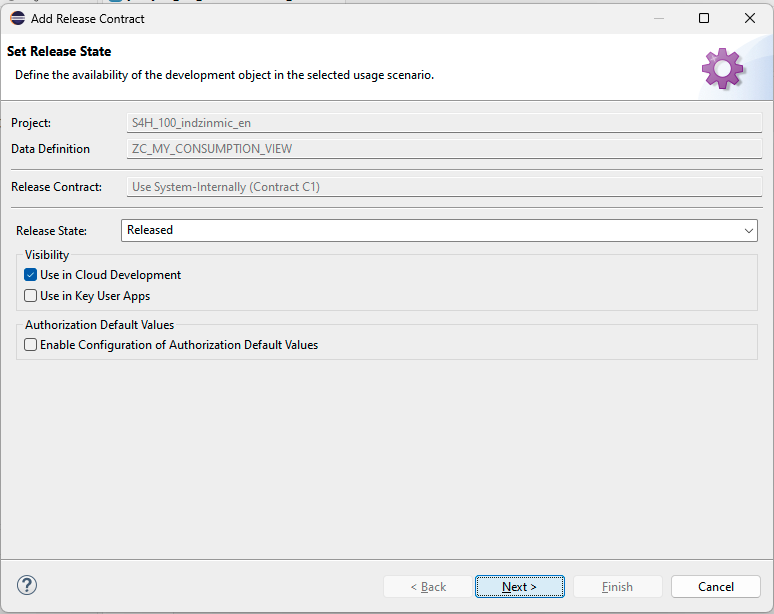
Single View
new /mxp/vcha_cl_va_cds_link(
  i_cds_view_name = conv #( cl_abap_structdescr=>describe_by_data( value zc_my_consumption_view( ) )->get_relative_name( ) ) "in order to make where used work, get the name dynamically
  i_parameter_definitions = value #(
    ( characteristic_name = 'THICKNESS'
      cds_parameter_name = 'P_THICKNESS'
      cds_parameter_null_name = 'P_THICKNESS_IS_NULL' ) ) "for integers, it may be an interesting info to check whether the value is assigned or not (null) -> boolean as CDS parameter
  i_field_mappings = value #(
    ( characteristic_name = 'PRODUCT_TYPE'
      cds_field_name = 'ProductType' )
    ( characteristic_name = 'PRODUCT_FORM'
      cds_field_name = '' ) ) ). "An empty 'cds_field_name' means the field is ignored even if present in the CDS view.
Multi View
The multi‑view connector is initialized slightly differently. Instead of a
single view name you pass a configuration table (see class
/mxp/vcha_cl_va_cds_link_multi). Shared fields are detected automatically and
restricted by intersection:
new /mxp/vcha_cl_va_cds_link_multi(
  value #( "first view
           ( cds_view_name = conv #( cl_abap_structdescr=>describe_by_data( value zc_my_consumption_view( ) )->get_relative_name( ) ) "in order to make where used work, get the name dynamically
             parameter_definitions = value #(
               ( characteristic_name = 'THICKNESS'
                 cds_parameter_name = 'P_THICKNESS'
                 cds_parameter_null_name = 'P_THICKNESS_IS_NULL' ) ) "for integers, it may be an interesting info to check whether the value is assigned or not (null) -> boolean as CDS parameter
             field_mappings = value #(
               ( characteristic_name = 'PRODUCT_TYPE'
                 cds_field_name = 'ProductType' )
               ( characteristic_name = 'PRODUCT_FORM'
                 cds_field_name = 'ProductForm' ) ) )
           "second view
           ( cds_view_name = conv #( cl_abap_structdescr=>describe_by_data( value zc_my_consumption_view2( ) )->get_relative_name( ) ) ) ) ).
Condition-based execution
For subclassing and condition-based execution of certain CDS views please consider this example:
"! <p class="shorttext synchronized" lang="en">test multi</p>
class zcl_vcha_demo_cds_multi_link definition
  public
  create public
  inheriting from /mxp/vcha_cl_va_cds_link_multi.

  public section.
    methods constructor.
  protected section.
    methods is_view_relevant redefinition.
  private section.
endclass.

class zcl_vcha_demo_cds_multi_link implementation.
  method constructor.
    super->constructor(
      value #( "first view
               ( cds_view_name = conv #( cl_abap_structdescr=>describe_by_data( value zc_my_consumption_view( ) )->get_relative_name( ) ) "in order to make where used work, get the name dynamically
                 parameter_definitions = value #(
                   ( characteristic_name = 'THICKNESS'
                     cds_parameter_name = 'P_THICKNESS'
                     cds_parameter_null_name = 'P_THICKNESS_IS_NULL' ) ) "for integers, it may be an interesting info to check whether the value is assigned or not (null) -> boolean as CDS parameter
                 field_mappings = value #(
                   ( characteristic_name = 'PRODUCT_TYPE'
                     cds_field_name = 'ProductType' )
                   ( characteristic_name = 'PRODUCT_FORM'
                     cds_field_name = 'ProductForm' ) ) )
               "second view
               ( cds_view_name = conv #( cl_abap_structdescr=>describe_by_data( value zc_my_consumption_view2( ) )->get_relative_name( ) ) ) ) ).
  endmethod.

  method is_view_relevant.
    "skip second view, if Thickness was not entered (any condition possible)
    case i_view->cds_view_name.
      when cl_abap_structdescr=>describe_by_data( value zc_my_consumption_view2( ) )->get_relative_name( ).
        if m_engine->m_container->get_assigned_value_for_cstic(
             m_engine->m_container->get_characteristic_by_name(
               i_cstic_name = 'THICKNESS' i_instance_id = m_engine->m_container->m_root_instance_id )->key ) is initial.
          return abap_false.
        endif.
    endcase.
    return abap_true.
  endmethod.
endclass.
The example shows how to configure the views directly within the CONSTRUCTOR. This step is optional, but since a custom class is created in this example, the benefit is that everything is kept in one place.